New in 2.0
AI Semantic Search
Search your Bible and song library by meaning, not just exact words. Works offline across English, Malayalam, Hindi, Tamil, Telugu and more.
 StageFlo
StageFlo by Zac Studios · v2.1.52
✦ AI Search — New in 2.0📡 Remote Stage View — New in 2.0✨ Live Visuals — New in 2.1Run worship slides in English, Malayalam, Hindi, Tamil, Telugu, and more from one fast workflow. Songs, scripture, media, stage display, and OBS lower-thirds — free forever for the first 100 churches.
Mac button is for Apple Silicon (M1–M4). On an Intel Mac? Get the Intel build
Free forever for the first 100 churches — early adopters keep it free for life.
Search your Bible and song library by meaning, not just exact words. Works offline across English, Malayalam, Hindi, Tamil, Telugu and more.
One click generates a public internet link for your stage display and remote controller — share it with musicians anywhere, no account needed.
Instant search across your song library and Bible. Present lyrics and verses in seconds.
Projector, stage display, OBS lower-thirds, and a mobile singer view — all from one place.
Run multilingual worship services with native-language, translated, and bilingual slide layouts for global congregations.
Audio-reactive animated backgrounds that move with your music. Customise colours, speed, and intensity — or layer a photo or video underneath for unique effects.
Type a theme, story, or feeling — StageFlo finds the right passages and songs across every language you work in. No internet required.
StageFlo generates a secure public internet link for your stage display and remote controller in one click — no account, no port-forwarding, no static IP. Send it to musicians before the service starts.
Transform your worship experience with built-in audio-reactive visuals. Choose from 10 stunning presets that move and breathe in sync with your music. Fine-tune colours, speed, glow, and intensity to match your atmosphere — or layer a photo or video underneath for something truly unique. Everything saves automatically, so your visuals are ready the moment you open your service.
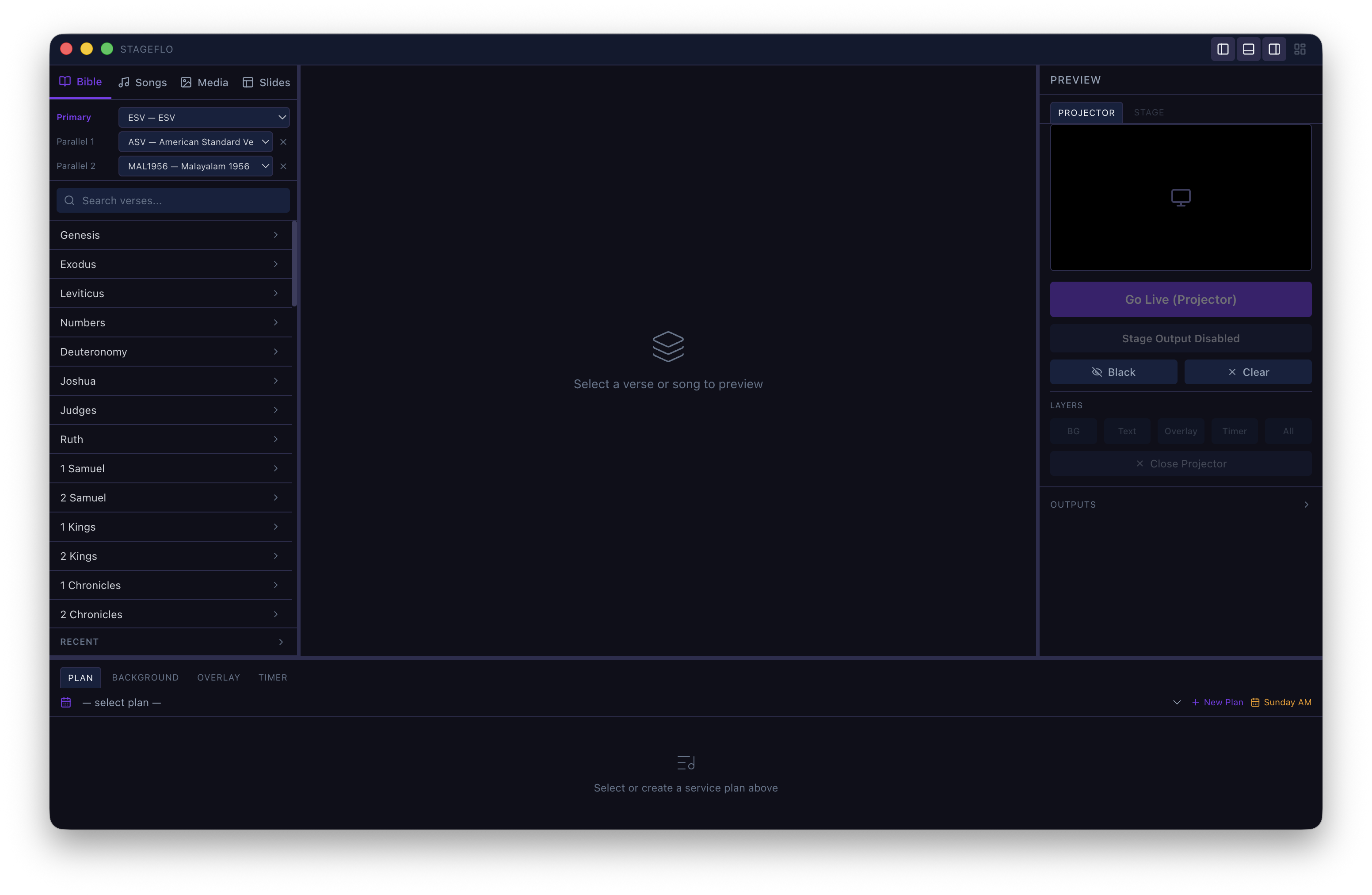
Playlist, preview, and live controls.
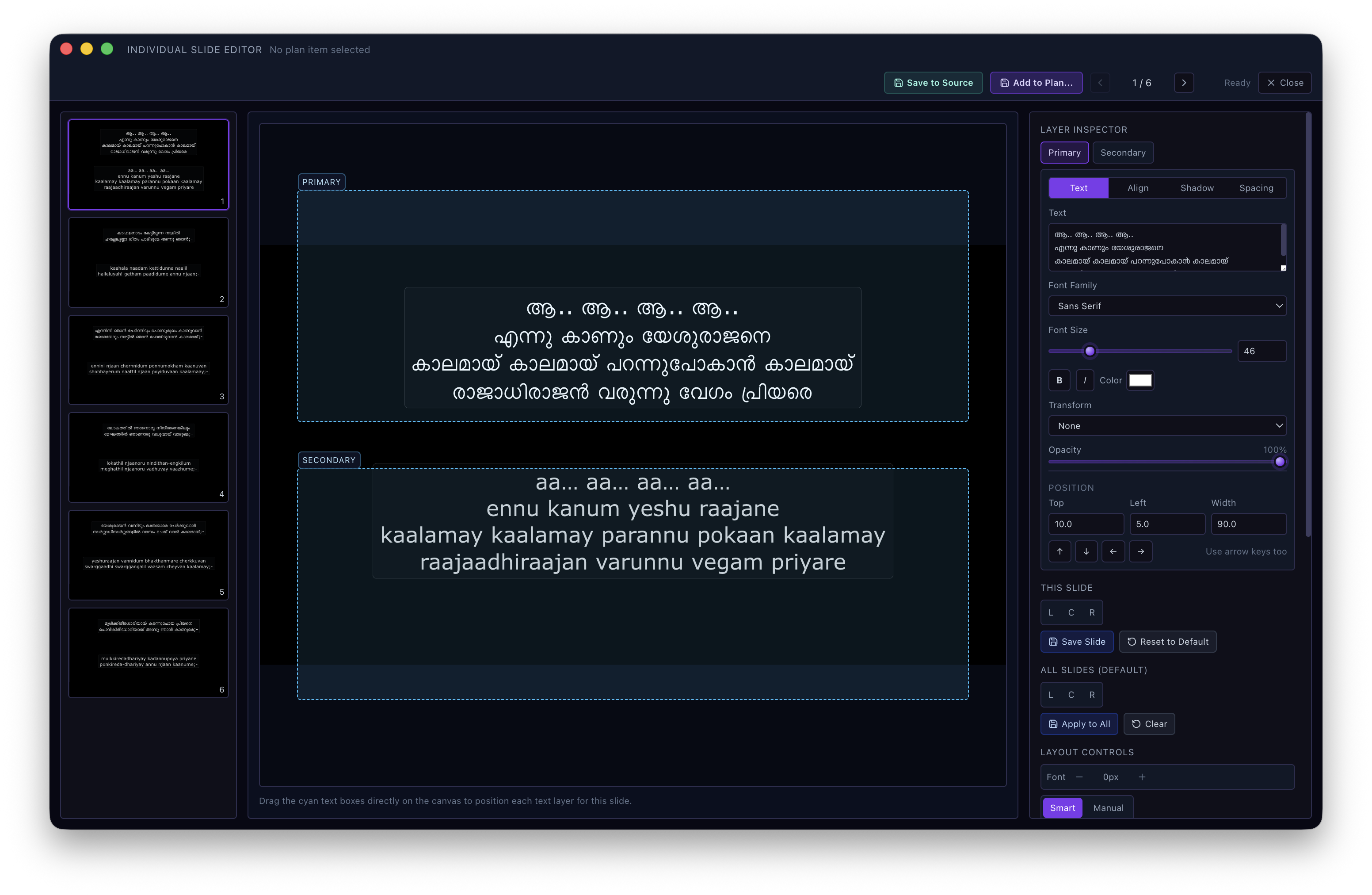
Typography, layers, and visual overrides.
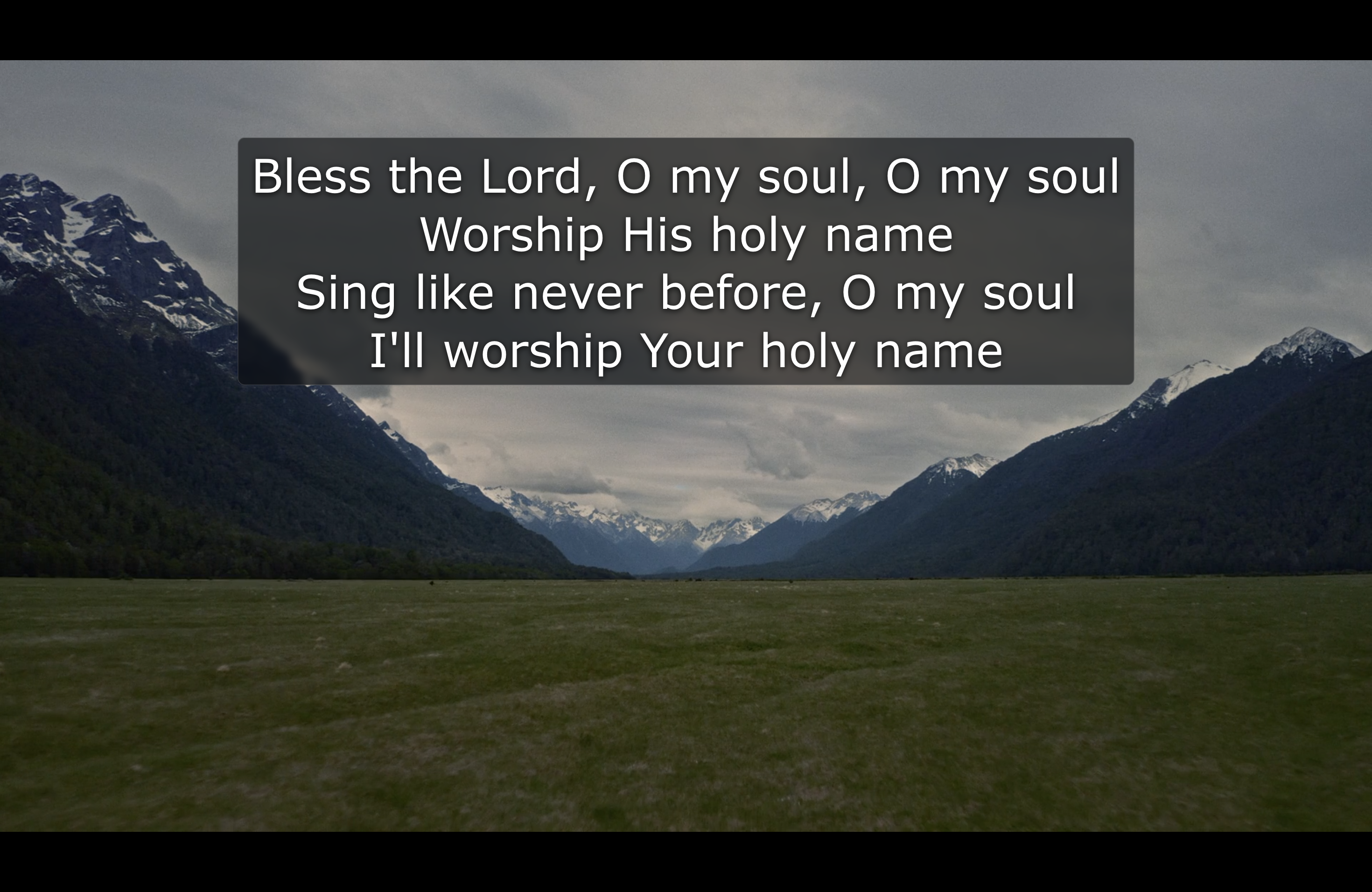
Congregation output and confidence monitor.
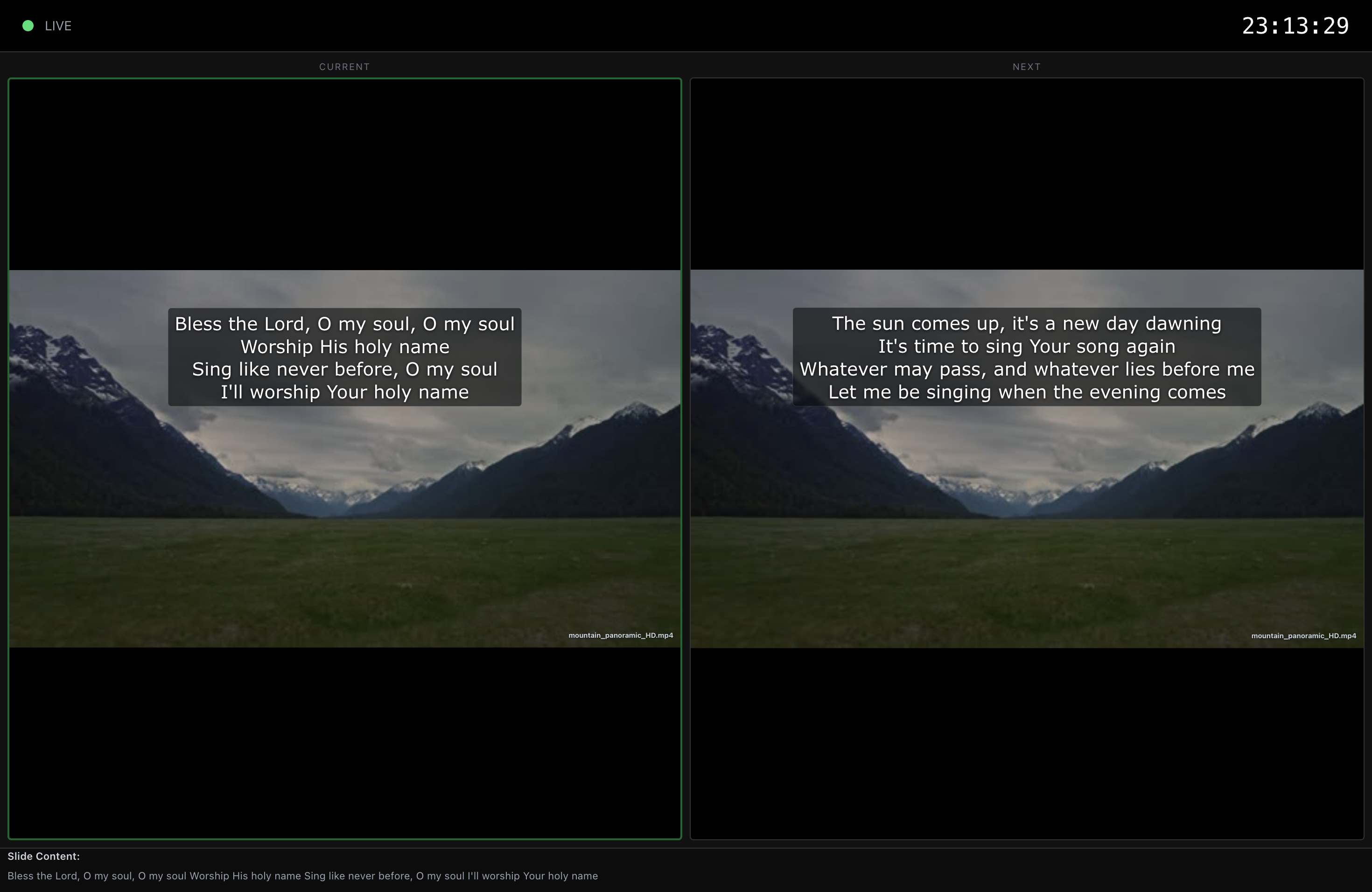
Current and next slide for speakers and musicians.
What’s new
From offline AI search to audio-reactive live visuals — powerful new capabilities shipped as free updates.
10 audio-reactive visualizer presets with customisable colours, speed, glow, and intensity. Layer any background image or video underneath for unique mixed effects.
Semantic search powered by multilingual-e5-small via ONNX — no cloud, no Ollama. Just type what you're looking for.
One click generates a live public URL (via Cloudflare) for your stage view and remote controller — shareable anywhere, no account needed.
Control slides from any phone or tablet on the same network — or from anywhere via the public link.
Push song titles and speaker names directly into your stream.
Import any Zefania-format Bible XML directly in the app — no external tools.
Fix a typo mid-service without leaving the live view.
Design once, apply across every slide and service.
Lock output windows to prevent accidental exposure. Press Cmd+L to lock, Cmd+R to restore.
Multilingual church presentation software
StageFlo helps multilingual, multicultural, Indian, diaspora, and international worship teams prepare lyrics, Bible verses, media, stage confidence views, and livestream overlays from one free app.
Prepare worship lyrics, Bible readings, notices, sermon media, and custom slides for congregations using more than one language.
Present scripture in English, Malayalam, Hindi, Tamil, Telugu, and other languages while keeping text readable on projector and stage displays.
Show native-language lyrics, transliteration, translations, and English support for second-generation, diaspora, and multicultural worship teams.
Send song titles, speaker names, and lower-third overlays into OBS for multilingual livestreams without building a separate graphics workflow.
Free worship software alternative
StageFlo is designed for churches that need reliable worship projection software without complicated setup or recurring software costs.
StageFlo focuses on the worship workflows churches use every week: songs, scripture, media, stage display, and fast live control, without a subscription barrier.
Teams that want a simpler desktop app can use StageFlo for drag-and-drop planning, visual slide editing, remote control, and multi-screen output.
StageFlo runs on macOS and Windows, supports offline service operation, and is free forever for the first 100 churches.
Yes — for the first 100 churches. StageFlo is in its early-adopter phase: the first 100 churches to join get StageFlo free forever, with no subscription, no feature gating, and no account required for core use. After that, paid plans for churches will be introduced, but early adopters keep free access for life.
StageFlo runs on macOS (Apple Silicon and Intel) and Windows 10/11.
Yes. StageFlo works fully offline, including its AI semantic search feature which runs a local ONNX model in-process — no internet connection required during a service.
StageFlo supports multilingual church services. The AI search works across English, Malayalam, Hindi, Tamil, Telugu, and more. You can run bilingual or multilingual worship with different languages on projector, stage, and livestream outputs.
Yes. StageFlo supports Indian and diaspora church workflows as part of its wider multilingual focus, including Malayalam, Hindi, Tamil, Telugu, English, bilingual lyrics, scripture projection, stage display, and livestream lower-thirds.
With one click, StageFlo generates a public internet URL via Cloudflare Tunnel for your stage display and remote controller. Share it with musicians or speakers anywhere — no account, no port-forwarding, no static IP needed.
Yes. StageFlo has a built-in OBS lower-thirds output, letting you push song titles and speaker names directly into your livestream.
StageFlo is free forever for the first 100 churches (early adopters keep it free for life; paid plans come later), includes offline AI semantic search for Bible and songs, and offers one-click internet-accessible stage view via Cloudflare Tunnel — features not available in ProPresenter or EasyWorship without additional cost or setup.
Download StageFlo free for Mac and Windows. No account needed.
Mac button is for Apple Silicon (M1–M4). On an Intel Mac? Get the Intel build